How to reset the Oil Service Light on Honda Accord: Step-by-step instructions
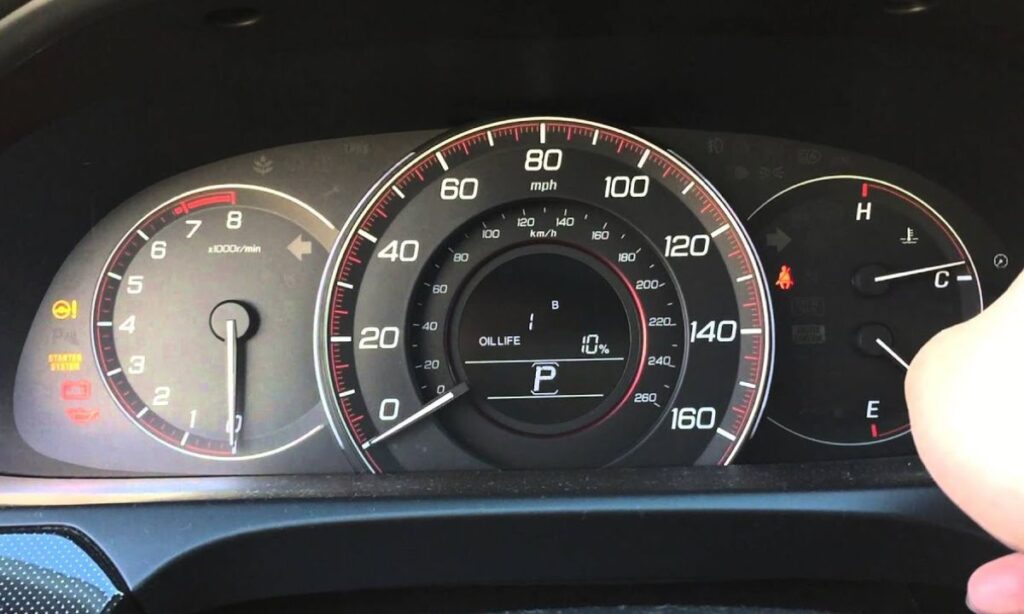
The oil service light (also called the Maintenance Minder or “Oil Life” indicator) on a Honda Accord is designed to remind you when it’s time for an oil change based on the vehicle’s actual driving conditions. After performing an oil change, you need to reset this light manually. The procedure varies slightly depending on the generation of your Honda Accord.
Below you will find clear, step-by-step instructions for the most common Honda Accord models from 2003 to the current generation.
7th Generation Honda Accord (2003–2007)
- Turn the ignition switch to the ON (II) position. Do not start the engine.
- Press the SELECT/RESET button on the instrument panel repeatedly until the engine oil life indicator is displayed.
- Press and hold the SELECT/RESET button for about 10 seconds. The oil life display will begin to blink.
- Release the button, then press and hold it again for another 5 seconds until the display resets to 100%.
- Turn the ignition off.
The oil service light should now be reset.
8th Generation Honda Accord (2008–2012)
- Turn the ignition to the ON (II) position without starting the engine.
- Press the SELECT/RESET knob on the instrument panel until the engine oil life percentage is shown on the display.
- Press and hold the SELECT/RESET knob for 10 seconds. The oil life number will start flashing.
- While the display is flashing, press and hold the knob again for another 5–10 seconds until the display resets to 100%.
- Turn the ignition off and start the engine to verify the light is gone.
9th Generation Honda Accord (2013–2017)
- Turn the ignition switch to the ON position (do not start the engine).
- Go to the Settings menu using the steering wheel controls or the i-MID display.
- Select Maintenance → Oil Life.
- Press and hold the SELECT/RESET button (located on the steering wheel or instrument panel) for about 10 seconds.
- The oil life percentage should reset to 100%.
- Turn the ignition off.
10th Generation Honda Accord (2018–2022)
This generation uses a fully digital instrument cluster.
- Turn the ignition to ON (do not start the engine).
- Use the steering wheel controls to navigate to the Maintenance screen on the digital display.
- Highlight Oil Life using the arrow buttons.
- Press and hold the Enter or Reset button on the steering wheel for 5–10 seconds.
- The oil life will reset to 100%.
- Turn the ignition off and restart the vehicle to confirm.
11th Generation Honda Accord (2023–Present)
The newest Accord features an even more advanced digital cockpit.
Method 1 (Most Common):
- Sit in the vehicle and press the Engine Start/Stop button twice without pressing the brake pedal (ignition ON, engine off).
- Using the steering wheel controls on the right side, scroll to the Maintenance menu.
- Select Oil Life or Maintenance Minder.
- Press and hold the OK or Reset button on the steering wheel for approximately 10 seconds.
- The display will show “Oil Life 100%” and the service light will turn off.
- Press the Engine Start/Stop button once to turn the ignition off.
Method 2 (Alternative via Settings):
- With ignition ON, go to Settings → Vehicle → Maintenance.
- Select Reset Oil Life and confirm the reset.
Important tips for all Honda Accord models
- Always perform the reset after the actual oil change has been completed.
- Make sure the vehicle is in Park (automatic) or Neutral (manual) with the parking brake engaged.
- If the light does not reset on the first try, repeat the procedure — timing of button presses is important.
- On newer models (2018+), the Maintenance Minder also tracks other items such as air filter, transmission fluid, spark plugs, and coolant. Resetting the oil life will usually reset only the oil portion unless you select “All Due Items”.
- If the oil service light returns shortly after resetting, it may indicate a low oil level, a faulty oil pressure sensor, or the need for a full diagnostic scan.
What to do If the reset doesn’t work
- Double-check that the ignition is in the correct position (ON, not ACC).
- Try holding the reset button longer (up to 15 seconds in some cases).
- Ensure the battery is fully charged — low voltage can prevent successful reset.
- For 2018 and newer models, some owners report success by disconnecting the battery negative terminal for 5–10 minutes, though this is not the recommended method.
Resetting the oil service light on your Honda Accord is a quick and simple procedure once you know the exact steps for your model year. Performing this reset correctly keeps your vehicle’s maintenance system accurate and helps you maintain proper service intervals for maximum engine longevity