How to reset the service oil life reminder on Ford Escape & Kuga – Detailed instructions
After performing an oil change or scheduled maintenance on your Ford Escape (sold as Kuga in Europe, Asia, and other markets), the dashboard often keeps showing the “Oil Change Required”, “Service Due”, “Maintenance Required”, or a low oil life percentage. This is the Intelligent Oil-Life Monitor (IOLM) system at work—Ford’s algorithm that calculates service intervals based on driving style, engine load, temperature, and more, rather than just mileage.
Resetting the reminder is crucial: it recalibrates the system to 100% oil life so it accurately predicts your next service. The best part? For nearly all 2013–2026 Escape/Kuga models (including gas, hybrid, and plug-in hybrid variants), you can do this DIY without any tools, using either the classic pedal method or the modern steering wheel menu.
Key Safety Reminders
- Only reset after you’ve actually changed the oil/filter or completed the service. Resetting prematurely hides real maintenance needs.
- Work in a safe, well-ventilated area with the vehicle parked and engine off.
- If the light returns immediately or pairs with a check engine/wrench icon, use an OBD-II scanner—there may be a fault code.
- Procedures are consistent across most years, but newer digital clusters (2020+) favor menu resets while the pedal method remains a reliable fallback.
Primary method: Brake + accelerator pedal reset (works on most 2013–2026 models)
This factory method from Ford’s official service content is the go-to for many Escapes/Kugas, especially if the menu option doesn’t appear or for quicker resets.
- Switch the ignition to ON (do not crank the engine).
- Key models: Turn key to “ON/RUN” position (dash illuminates).
- Push-button start: Press START/STOP once without pressing the brake (accessory mode), or press START without brake for some hybrids.
- Fully depress both pedals simultaneously:
- Push the accelerator (gas) pedal all the way to the floor.
- At the same time, firmly press the brake pedal to the floor.
- Hold both pedals down fully for 20–30 seconds.
- After ~3 seconds: Dashboard shows “Reset in progress”, “Service: Oil reset in progress”, or similar.
- Continue holding—around 20–25 seconds later (up to 30 sec max), it changes to “Reset complete”, “Oil reset successful”, or oil life jumps to 100%.
- Release pedals, switch ignition OFF, then start the engine.
- Verify: Oil life reads 100%, or the service message is gone. No warning chime or light.
This method is documented in Ford owner manuals and works reliably on 2013–2019 (3rd gen), 2020–2026 (4th gen), hybrids, and PHEVs.
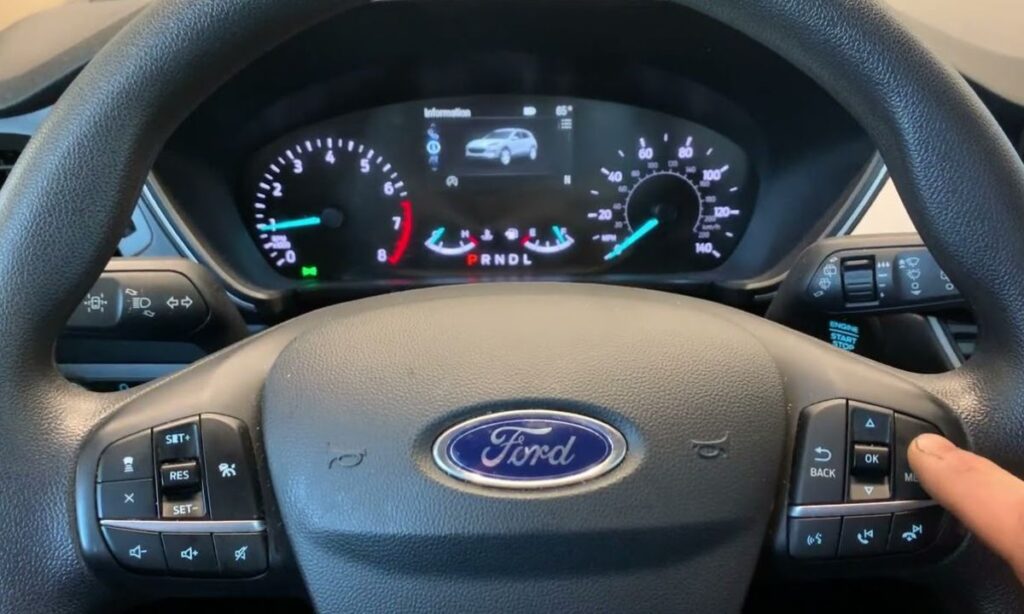
Alternative method: Steering wheel menu reset (Preferred on 2020–2026 digital clusters)
Newer fourth-generation Escapes/Kugas (especially 2020+ with 12.3″ digital instrument panel or SYNC 4) use steering wheel controls for a cleaner reset. This is the most common method shown in recent owner videos.
- Ignition ON (engine off, as above).
- Use right-side steering wheel controls (arrows, OK/Select, Menu/Back):
- Press Menu or arrow to enter main menu / information display.
- Scroll to Settings, Vehicle, Vehicle Maintenance, or directly Oil Life / Information (eye icon).
- Select Oil Life or Oil Change screen (shows current % or reminder).
- Press and hold OK / Reset / Select button for 3–10 seconds.
- Screen prompts “Hold OK to reset” or similar.
- Hold until “Reset Successful”, “Oil Life Reset”, or percentage flips to 100%.
- Exit menu, cycle ignition OFF → ON, and start engine to confirm.
For hybrids/PHEVs (e.g., 2021–2026 Kuga PHEV or Escape Hybrid): Ensure vehicle is in “Ready” mode if needed, but standard ignition ON works.
Quick year/model reference
- 2013–2019 Escape/Kuga: Pedal method primary; some early models may need longer hold (up to 30 sec).
- 2020–2026 Escape/Kuga (including facelifts, hybrids, PHEVs): Menu + hold OK is fastest; pedal method as backup if menu fails.
- If menu doesn’t show Oil Life: Use pedal method—it’s universal across most Ford vehicles post-2011.
Common troubleshooting
- No message appears during pedal hold? Ensure pedals are fully floored (no partial press), ignition is truly ON, and try again. Some require exactly 25 seconds.
- Light returns right away? Service may not be fully completed, or another maintenance item (e.g., air filter, transmission) is due—check full IOLM messages.
- Hybrid-specific quirks: If high-voltage battery mode interferes, try pedal method with vehicle in neutral or after short drive.
- Still stuck? Rare cases need FORScan app + OBD adapter or dealer visit to force reset via module.
Resetting takes 30–60 seconds and keeps your Escape/Kuga’s smart maintenance system accurate. Ford recommends following the IOLM (typically 7,500–10,000 miles/12–18 months), using Motorcraft or equivalent oil, and resetting every service. This simple habit extends engine life and preserves resale value. If your model behaves differently, grab the exact owner’s manual from Ford’s site. Drive safe and stay on schedule!