How to Reset Oil Change Light on BMW 5 Series – All Gens
Resetting the oil change light on a BMW 5 Series is a routine but essential task after every oil service. BMW uses its own onboard computer system — called CBS (Condition Based Service) — to monitor oil life and schedule maintenance intervals. Unlike many other brands, BMW does not use a simple mileage-based reset; it calculates remaining oil life based on driving conditions, engine temperature cycles, and mileage. After an oil change, if the CBS data is not reset, the system will continue to display incorrect service reminders. This guide covers every generation of the BMW 5 Series from the E28 through the G30/G31, providing exact step-by-step reset procedures for each.
Understanding BMW CBS and Oil Service Indicators
BMW introduced Condition Based Service (CBS) starting with the E60 5 Series (2003). Earlier models use a simpler Service Interval Indicator (SII) that resets by a manual procedure using the instrument cluster buttons. From the F10 generation onward, resets can also be performed through the iDrive system. It is critical to use the correct reset method for your specific generation to avoid errors or incomplete resets.
BMW 5 Series Generations Overview
- E28 – 1981 to 1988
- E34 – 1988 to 1996
- E39 – 1995 to 2004
- E60 / E61 – 2003 to 2010
- F10 / F11 – 2010 to 2017
- G30 / G31 – 2017 to present
How to Reset Oil Change Light on BMW 5 Series E28 (1981–1988)
The E28 uses a basic green/yellow/red LED service indicator on the dashboard. It does not have a digital CBS system.
- Locate the service interval reset button on the instrument cluster, typically behind the odometer reset knob or accessible through the instrument panel.
- Turn the ignition to position 1 (accessories on, engine off).
- Press and hold the reset button for approximately 5 seconds until the indicator light changes color or turns off.
- On some E28 models, a small hole on the instrument cluster face accepts a thin wire or pin to depress the internal reset button.
- Release and turn ignition off to confirm reset.
How to Reset Oil Change Light on BMW 5 Series E34 (1988–1996)
- Insert key into ignition but do not start the engine.
- Turn ignition to position 1.
- Press and hold the trip odometer reset button (left stalk or instrument cluster button depending on build date).
- Hold for 5–10 seconds; the oil service indicator will begin to flash, then show a reset confirmation (series of dashes or the indicator extinguishes).
- Release button and turn ignition off.
- On later E34 models equipped with the SII, the indicator shows a green dot when fully reset.
How to Reset Oil Change Light on BMW 5 Series E39 (1995–2004)
- Turn ignition to position 1 (do not start engine).
- Press and hold the left instrument cluster button (trip reset / BC button) for approximately 5 seconds.
- The service indicator display will cycle through available service items (Oil Service, Inspection I, Inspection II).
- When ‘OIL SERVICE’ appears, press and hold the button again for 5 seconds.
- The display will show ‘RESET?’ – press and hold the button once more to confirm.
- A confirmation message such as ‘—‘ or ‘RESET’ will appear.
- Turn ignition off to complete the reset.
How to Reset Oil Change Light on BMW 5 Series E60 / E61 (2003–2010)
The E60 introduced the CBS system. Resets are done via the instrument cluster menu.
- Turn ignition on (do not start engine, or engine can be running).
- Press the BC button on the turn signal stalk to navigate to the main menu in the instrument cluster.
- Use the BC button to scroll until you find ‘Service’ or ‘CBS’ menu.
- Navigate to ‘Engine Oil’ or ‘Oil Service’.
- Press and hold the BC button for approximately 5 seconds.
- A message will ask for confirmation — hold the button again.
- The system will display the new oil service interval (usually 15,000 km or 1 year depending on market).
- Turn ignition off to complete.
- Alternatively, use a BMW-compatible OBD2 scanner (such as Carly, ISTA, or BimmerCode) to reset CBS values directly.
How to Reset Oil Change Light on BMW 5 Series F10 / F11 (2010–2017)
- Start the vehicle or turn ignition to position 2.
- Press the iDrive controller to open the main menu.
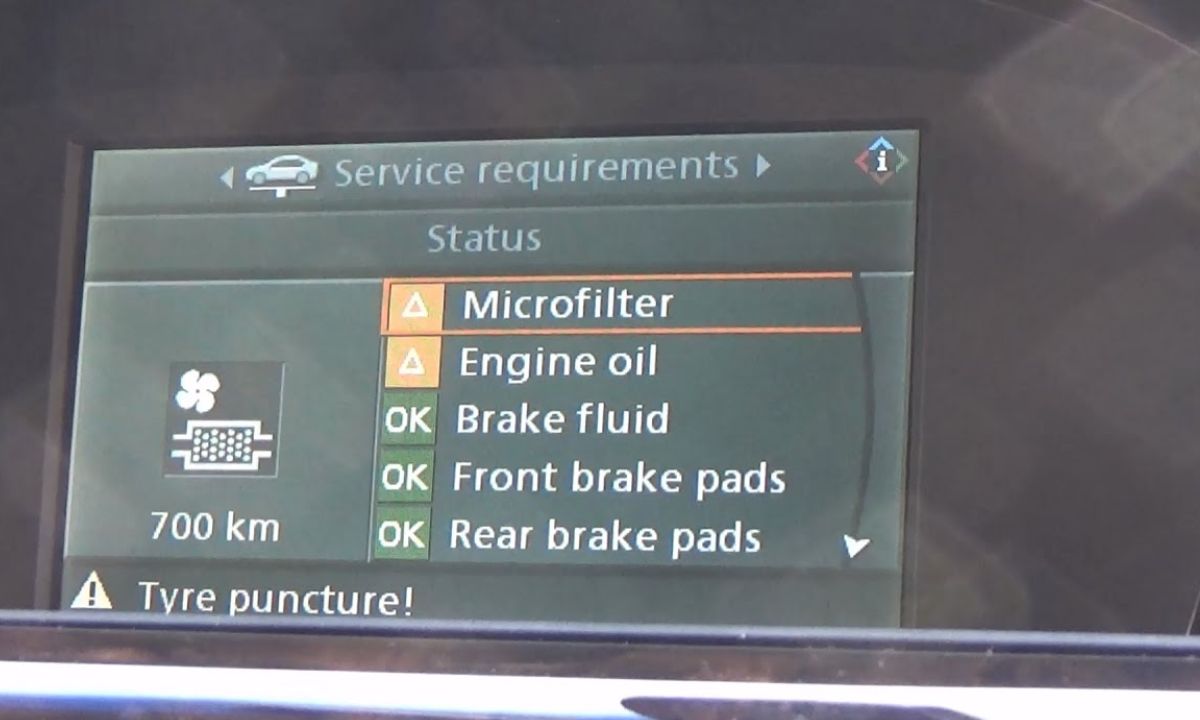
- Navigate to ‘Vehicle Information’ → ‘Vehicle status’ → ‘Service required’.
- Select ‘Engine Oil’ from the list of CBS items.
- Select ‘Reset’ and confirm when prompted.
- The system will ask you to enter the oil specification used (e.g., BMW Longlife-01, LL-04) — select the correct one.
- Confirm and the CBS counter resets automatically.
- Without iDrive (instrument cluster method): press and hold the left trip button on the instrument cluster while turning ignition to position 1, cycle through to Oil Service, and hold to reset.
How to Reset Oil Change Light on BMW 5 Series G30 / G31 (2017–Present)
- Start the engine or switch ignition to position 2.
- Using the iDrive touchscreen or controller, go to ‘My Vehicle’.
- Select ‘Vehicle Status’ → ‘Service’.
- Find ‘Engine Oil’ in the list and tap it.
- Select ‘Reset’ and confirm the action.
- Choose the correct oil specification when prompted (important for CBS calculation accuracy).
- Turn ignition off to finalise.
- On G30 models, you can also use a compatible OBD2 app like Carly for BMW or BimmerCode to perform the CBS reset via Bluetooth OBD2 adapter.
Using an OBD2 Scanner to Reset BMW 5 Series Oil Service Light
For all generations from E60 onward, a BMW-specific OBD2 scanner can reset the oil service indicator reliably.
- Connect the scanner to the OBD2 port (located under the dashboard on the driver’s side).
- Navigate to ‘Service Reset’ or ‘CBS Reset’ in the scanner menu.
- Select ‘Engine Oil’ and confirm reset.
- Recommended tools: Carly for BMW, BimmerCode, Autel MK808, Launch X431, ISTA+.
- Generic OBD2 scanners often cannot access BMW CBS data — always use BMW-specific tools.
Common Issues After Reset
- Light comes back immediately: indicates an incomplete reset or the wrong service item was cleared — repeat procedure.
- CBS counter not updating correctly: the wrong oil spec was entered — redo the reset and select the correct BMW Longlife specification.
- iDrive not showing reset option: a software glitch — restart vehicle and retry, or use OBD2 scanner.
- Multiple service warnings: CBS tracks several items independently — oil reset only clears the oil counter, not brake fluid or spark plug reminders.