How to Reset Oil Change Light on Volkswagen Tiguan
The oil change reminder light on the Volkswagen Tiguan is part of the onboard service interval system, known as the Service Interval Display (SID) or the CBS (Condition Based Service) system on newer models. After performing an oil change, this light must be manually reset to begin a new service countdown. If it is not reset, the vehicle will continue to display incorrect reminders and may trigger unnecessary warnings. This guide covers every generation of the Tiguan, including the Mk1 (2007–2017) and Mk2 (2016–present), with step-by-step reset procedures for each.
Understanding the Oil Service Light on the Volkswagen Tiguan
Volkswagen uses a flexible service interval system that monitors driving conditions, mileage, and time elapsed to calculate when an oil change is needed. On older Tiguan models, this appears as a simple spanner/wrench warning symbol combined with a mileage countdown. On newer models with digital dashboards, the CBS system shows individual service items including engine oil, brake fluid, and spark plugs.
- Mk1 Tiguan (2007–2011): Basic analog cluster with SID, shows km remaining until next service
- Mk1 Tiguan (2011–2017): Updated MFD (Multi-Function Display) in instrument cluster, same reset procedure
- Mk2 Tiguan (2016–2023): Digital cockpit or standard MFD, uses CBS system, more detailed service tracking
- Mk2 Tiguan Allspace (2017–present): Same CBS procedure as standard Mk2
- Tiguan eHybrid (2021–present): Same procedure via MIB3 infotainment or instrument cluster
Method 1: Resetting the Oil Light on Tiguan Mk1 (2007–2017) Using the Instrument Cluster Buttons
This is the most common method for first-generation Tiguans without a touchscreen infotainment system.
- Turn the ignition to position 1 (accessories on, engine off) — do not start the engine
- Use the left stalk button (on the wiper stalk or the MFD button below the speedometer, depending on year) to navigate to the Service menu in the instrument cluster display
- Press and hold the 0.0/Reset button on the instrument cluster (the button at the bottom left of the cluster or on the left stalk) for approximately 3–5 seconds
- The display will show the current service interval status — keep holding until the display shows ‘Reset?’ or begins flashing
- Confirm the reset by pressing the button again or holding further as prompted
- The display should now show the full service interval reset, typically OIL CHANGE IN 15,000 km or equivalent mileage based on your service plan
- Turn the ignition off and then back on to confirm the light has cleared
Method 2: Resetting the Oil Light on Tiguan Mk2 (2016–Present) Using the Instrument Cluster
The second-generation Tiguan uses the CBS system and can be reset directly through the instrument cluster menu.
- Turn the ignition on without starting the engine, or start the engine and let it idle
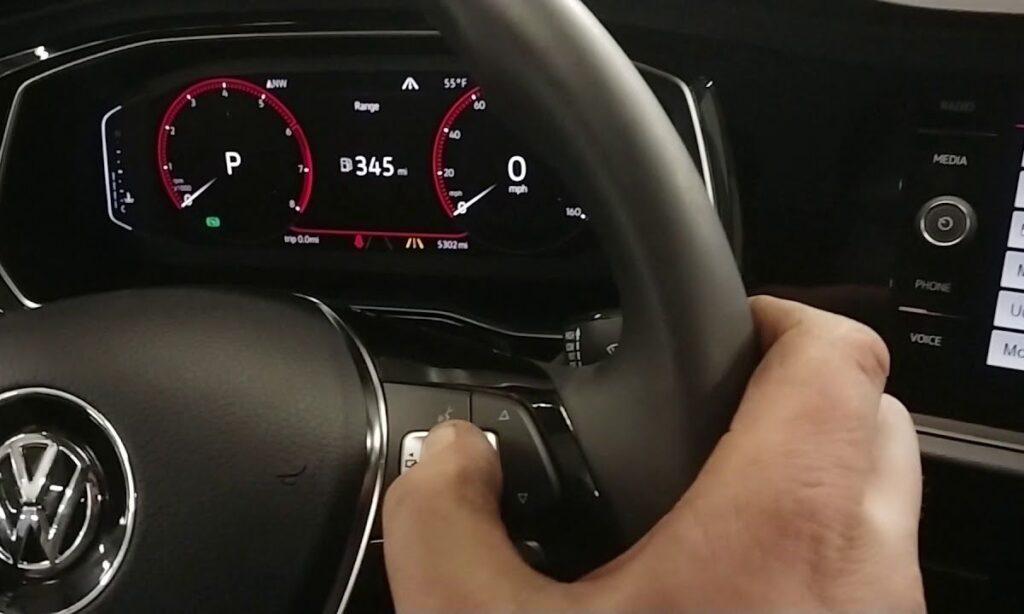
- Press the left or right arrow button on the left side of the steering wheel to navigate the instrument cluster menus
- Scroll to the ‘Service’ option or look for the spanner/oil can icon in the trip computer display
- Once in the Service submenu, find ‘Oil Change Service’ or ‘Engine Oil’ under CBS items
- Press and hold the OK/confirm button (center button on the left steering wheel cluster) for approximately 3 seconds
- A prompt will appear asking to confirm the reset — select ‘Yes’ or press OK to confirm
- The system will display ‘Service reset successful’ or update the countdown mileage
- Turn off the ignition and restart the vehicle to verify the light is gone
Method 3: Resetting via Volkswagen MIB2/MIB3 Infotainment System (Mk2 Tiguan)
Some Mk2 Tiguans allow the service reset to be performed through the main touchscreen unit.
- Start the vehicle or turn ignition on
- On the main touchscreen, tap the ‘Car’ or ‘Vehicle’ icon (steering wheel icon) in the main menu
- Navigate to ‘Service & Checks’ or ‘Maintenance’
- Select ‘Service Interval’ or ‘Oil Change’
- Tap ‘Reset’ and confirm when prompted
- The system will acknowledge the reset and update the service countdown
Method 4: Resetting Using VCDS or OBD Diagnostic Tool
For a reliable and complete reset, especially if the manual method does not work, a VCDS (VAG-COM Diagnostic System) cable or compatible OBD2 scanner with VW-specific functions can be used.
- Connect the OBD2 scanner to the 16-pin OBD port located under the dashboard on the driver’s side
- Turn the ignition on or start the engine
- Open the diagnostic software and select Volkswagen > Tiguan
- Navigate to ‘Service Reset’ or ‘Adaptation’ within the instrument cluster (address 17)
- Select the oil service counter and choose ‘Reset’ or set the value to the correct interval
- Confirm and exit — the CBS system will be fully reset with the correct mileage
Common Issues When Resetting the Oil Light
- Light returns immediately after reset: Indicates the reset was not confirmed properly — repeat the hold-button step more slowly
- Cannot find Service menu: Ensure you are navigating correctly; on Mk1 models, cycle through menus using the MFD button until ‘INSP’ or ‘OIL’ appears
- CBS shows multiple service items: Each item (oil, brakes, DSG service) must be reset individually if all are overdue
- Spanner light stays on after reset: Could indicate a separate fault code unrelated to the oil service; scan with OBD2 for stored DTCs
- Reset option greyed out on touchscreen: Engine must be running or ignition fully on for the reset option to become active on some software versions
Recommended Oil Change Intervals for Volkswagen Tiguan
- Tiguan with longlife oil (VW 504 00 / 507 00): Up to 30,000 km or 2 years, whichever comes first — CBS calculates dynamically
- Tiguan with fixed interval oil (VW 502 00): Every 15,000 km or 1 year
- Tiguan 1.4 TSI / 2.0 TSI petrol engines: VW 504 00 specification, 0W-30 or 5W-30
- Tiguan 2.0 TDI diesel engines: VW 507 00 specification, 0W-30 — essential for DPF-equipped models
- Tiguan eHybrid: Follow CBS display; hybrid operation may extend intervals but VW 508 00 or 504 00 spec oil required