How to Reset Oil Change Light on Ford Escape – All Generations
Resetting the oil change light on a Ford Escape is a straightforward procedure, but the exact steps vary depending on the generation and model year of your vehicle. Whether you drive a first-gen Escape from the early 2000s or the latest sixth-generation model, this guide covers every method in detail so you can clear the oil life reminder quickly and correctly after performing an oil change.
Why the Oil Change Light Comes On
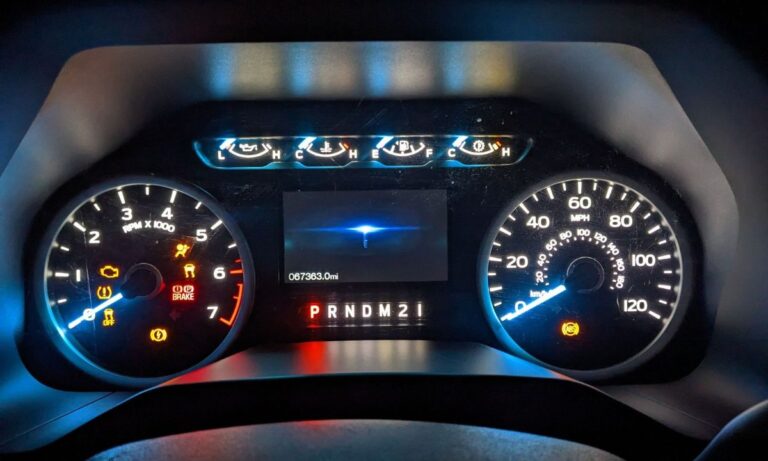
The Ford Escape uses an Intelligent Oil-Life Monitor (IOLM) system that calculates oil degradation based on engine revolutions, temperature cycles, and driving conditions — not simply mileage. When oil life drops to 0%, the message ‘Oil Change Required’ or the wrench icon illuminates on the instrument cluster. After changing the oil, the system must be manually reset; it will not reset itself.
Ford Escape Generations Overview
- First Generation (1st Gen): 2001–2007 – Early IOLM, uses ignition key method
- Second Generation (2nd Gen): 2008–2012 – Updated instrument cluster, message center buttons
- Third Generation (3rd Gen): 2013–2019 – MyKey system, Info button or steering wheel controls
- Fourth Generation (4th Gen): 2020–2022 – Digital cluster, steering wheel menu navigation
- Fifth/Sixth Generation (5th/6th Gen): 2023–present – SYNC 4 infotainment integration, updated menu layout
How to Reset Oil Change Light – First Generation (2001–2007)
The first-generation Escape uses a simple ignition-based reset procedure without any buttons on the steering wheel.
- Turn the ignition key to the ON position (do not start the engine)
- Fully depress the accelerator pedal slowly three times within 10 seconds
- Turn the ignition to the OFF position
- Turn ignition back to ON and verify the oil life has reset to 100% or the light is off
- If unsuccessful, repeat the process — the pedal must be pressed fully to the floor each time
How to Reset Oil Change Light – Second Generation (2008–2012)
The second-generation Escape introduced a message center with buttons on the instrument cluster or steering wheel column stalk.
- Turn the ignition to ON (do not start the engine, or start it if required)
- Use the RESET or arrow buttons on the steering column stalk to navigate to ‘Oil Life’ or ‘Oil Change Required’ in the message center display
- Press and hold the RESET button for approximately 2 seconds until the display shows ‘Oil Life Reset’ or the percentage resets to 100%
- Turn the ignition off and restart the vehicle to confirm the reset
- Alternatively, use the accelerator pedal method from the first generation — it also works on most 2008–2012 models
How to Reset Oil Change Light – Third Generation (2013–2019)
The third-generation Escape features a more advanced instrument cluster with an information display controlled via steering wheel buttons.
- Start the engine or turn the ignition to the RUN/ON position
- Press the left arrow button on the steering wheel to navigate to the Settings menu
- Use the up/down arrow buttons to scroll to ‘Vehicle’ then select it with OK
- Scroll down to ‘Oil Life’ and press OK
- Select ‘Reset’ and confirm by pressing and holding OK for 2 seconds
- The display will show ‘Oil Life 100%’ confirming the reset was successful
- On models without a full steering wheel menu: press the INFO button on the instrument cluster repeatedly until oil life appears, then hold RESET
How to Reset Oil Change Light – Fourth Generation (2020–2022)
The fourth-generation Escape uses a fully digital or semi-digital instrument cluster with an updated menu structure.
- With the vehicle running or ignition in the ON position, press the left directional button on the left steering wheel stalk
- Navigate using the up/down arrows to find ‘Settings’
- Enter Settings and scroll to ‘Vehicle Settings’
- Select ‘Oil Life Reset’ or ‘Reset Oil Life’
- Press and hold OK or the center button until a confirmation message appears
- Oil life will return to 100% and the wrench indicator will turn off
How to Reset Oil Change Light – 2023 and Newer Escape
The latest Ford Escape generation integrates vehicle settings through the SYNC 4 touchscreen as well as the steering wheel controls.
- Start the engine or place the ignition in ON mode
- On the SYNC 4 touchscreen, tap ‘Vehicle’ from the home screen or swipe left
- Tap ‘Vehicle Settings’, then navigate to ‘Oil Life’
- Tap ‘Reset’ and confirm the action on the prompt
- Alternatively, use the steering wheel left control pad — navigate to Settings > Vehicle > Oil Life > Reset
- Confirm the reset; the cluster will display 100% oil life
Using a OBD2 Scanner to Reset the Oil Light
If the manual reset methods fail, an OBD2 scanner with Ford-specific service reset functions can clear the oil life monitor.
- Plug the OBD2 scanner into the diagnostic port under the dashboard (driver’s side)
- Turn the ignition to ON or start the engine
- Navigate to ‘Service Reset’ or ‘Oil Reset’ in the scanner menu
- Select Ford Escape and the correct model year
- Execute the Oil Life Reset function and confirm
- Compatible tools include: Foxwell NT510, Autel MX808, Launch CRP129E, and similar Ford-compatible scanners
Important Notes and Common Mistakes
- Do not reset the oil life without changing the oil — the monitor tracks actual oil condition
- If the light returns immediately after reset, the oil change may not have been performed correctly or the system did not register the reset
- On hybrid Escape models (2005–2012 and 2020+), the oil life system functions the same way but the engine-off state may differ — ensure the hybrid system is in RUN mode, not EV-only mode
- The wrench icon and the oil pressure warning light are different — low oil pressure is a red warning and requires immediate attention, not just a reset
- Resetting via the accelerator pedal method works across most Ford models and years as a universal fallback
- After reset, always verify the oil level with the dipstick before driving