
Mazda Oil Change Light Reset: How to Clear the Wrench Icon After a Service
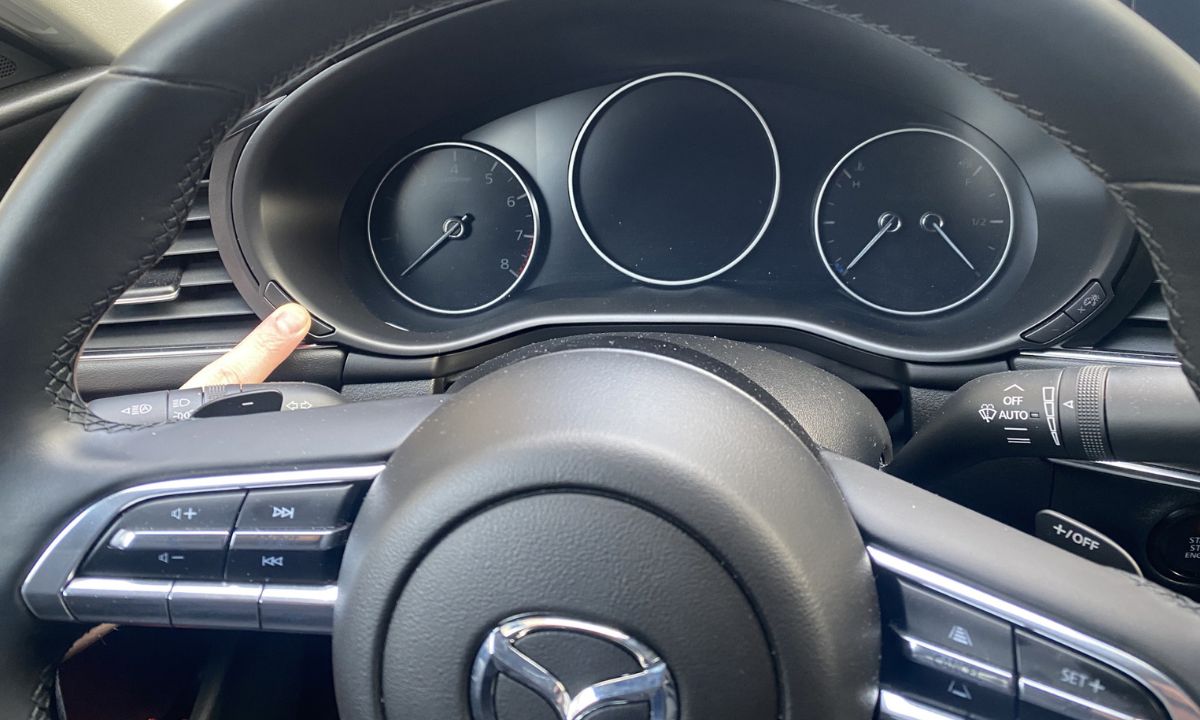
After an oil change on a Mazda, the wrench icon and “Service Due Soon” message stay on until you manually reset them. Mazda uses two different reset methods depending on the generation — current models with Mazda Connect use the infotainment touchscreen, while older models use a Trip button sequence on the instrument cluster. Since neither method requires tools or a scanner, the reset takes under two minutes once you know the correct path for your vehicle.
Via Mazda Connect Infotainment
This method applies to all current Mazda models with the Mazda Connect touchscreen — including the Mazda3, Mazda6, CX-5, CX-30, CX-50, CX-9, CX-90, and MX-5 Miata from approximately 2014 onward. Although the exact menu names vary slightly between model years, the navigation path is consistent:
- Turn the ignition to ON without starting the engine.
- On the infotainment touchscreen, select Information — on some earlier models this appears as Applications.
- Scroll down to Vehicle Status Monitor and select it.
- Select Vehicle Maintenance Settings or Maintenance.
- Choose the service item to reset — typically Reset Oil Change Distance or Reset Service Interval.
- Select Reset and confirm when prompted.
- Turn the ignition off and restart to verify the wrench icon has cleared.
On the CX-5 from 2021 onward, the menu path starts at Information rather than Applications. Furthermore, on the CX-90 and newer models, the same option appears under Settings → Vehicle → Maintenance if the Vehicle Status Monitor path is not visible from the Information menu.
Via Trip Button on Instrument Cluster
This method works on older Mazda models without a touchscreen infotainment system, including the Mazda3 and Mazda6 up to approximately 2013, as well as some older CX-5 and CX-9 variants. Additionally, this procedure serves as a backup reset method on some newer models when the touchscreen method does not register:
- Turn the ignition to ON without starting the engine.
- Press and hold the Trip button on the instrument cluster until the odometer displays the trip meter.
- Turn the ignition to OFF.
- Press and hold the Trip button again — do not release it.
- While holding, turn the ignition back to the ON position.
- Continue holding the Trip button until the maintenance notification appears on the dashboard display.
- Release the Trip button, then press it again quickly to reset the notification.
- The maintenance counter resets and the wrench icon clears.
- Turn the ignition off and restart to confirm.
The key detail in this sequence is the quick press at step 7 — holding the button too long after the notification appears will not trigger the reset. Release it fully first, then press once briefly.
What the Wrench Icon Means
The Mazda wrench indicator is a scheduled maintenance reminder, not a fault light. It activates at preset mileage intervals — typically every 5,000 or 7,500 miles depending on the model and the service schedule selected. Since it operates on a fixed counter rather than an oil life algorithm, it does not measure oil condition directly. However, Mazda recommends 0W-20 full synthetic oil on most current models, which allows 7,500 to 10,000-mile change intervals under normal driving conditions.
The wrench icon is separate from the Check Engine light. Therefore, resetting the maintenance counter does not affect any stored fault codes, and a Check Engine light requires a diagnostic scan rather than a service reset. If both lights appear simultaneously, address the Check Engine light separately.
If the wrench icon returns within a short distance after a confirmed reset, the most likely cause is an incomplete reset sequence — specifically, the ignition was not in the correct position, or the confirmation step was missed. Repeating the procedure correctly resolves this in most cases. However, if the light returns consistently after multiple confirmed resets, a fault code stored in the ECU may be triggering the warning, which requires an OBD2 scan to identify.

