How to Reset the Service Light on Genesis — All Models Step by Step
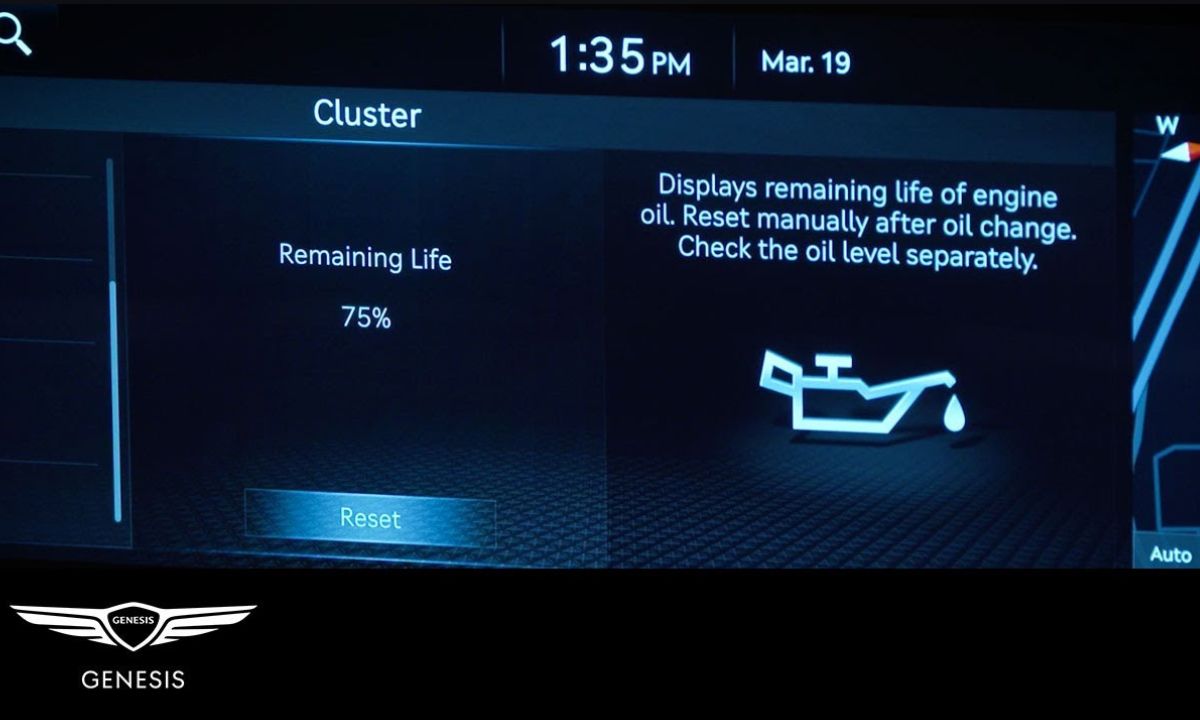
After an oil change on a Genesis, the service reminder and oil life indicator need to be reset manually — dealers sometimes skip this step, leaving owners with a persistent warning. Genesis uses two separate reminder systems that can both display a service notification: the oil life indicator in the instrument cluster and the service interval reminder in the connected services menu. In most cases, resetting the cluster indicator is sufficient.
With Steering Wheel Controls and Instrument Cluster
The GV70, GV80, G70, and G80 all use this method as the primary reset procedure:
- Start the engine or turn the ignition to ON.
- Use the right-side steering wheel buttons to navigate through the instrument cluster menu.
- Scroll until you find the SERVICE IN item — it displays a wrench icon alongside the remaining distance or time to next service.
- Press and hold the OK button until the service counter resets.
- Scroll to Service Interval and set the desired mileage or time interval if you want to adjust the default.
- Turn the ignition off and restart to confirm the reminder has cleared.
The scroll wheel near the steering wheel buttons can also be used to navigate — on the GV70 specifically, rotating this wheel is faster than pressing the arrow buttons when moving through long menus.
With Infotainment Touchscreen Menu
The GV80 and newer G80 variants with a larger touchscreen allow the reset through vehicle settings:
- From the main infotainment screen, go to Setup → Vehicle → Cluster.
- Find Service Interval and select it.
- Choose Reset to clear the current counter, or enter a custom interval in miles or kilometres.
- Confirm the selection. The cluster display will update immediately.
- Restart the engine to verify the reminder is gone.
Note that the Genesis Connected Services menu also has a separate service reminder tied to a 90-day interval — this one cannot be customised and is distinct from the cluster-based oil life indicator. If the cluster reminder has been cleared but a notification still appears through the Genesis app or connected services, this is the secondary reminder and clears automatically after the interval passes.
With Instrument Cluster Button (Older G80 and G90)
Pre-2021 Genesis sedans — the G80 and G90 before the full redesign — use a button on the instrument cluster rather than steering wheel navigation:
- Turn the ignition to ON without starting the engine.
- Press the cluster display button to cycle through the information screens until OIL LIFE appears.
- Press and hold the button for approximately 5 seconds until the percentage resets to 100%.
- Turn the ignition off and restart to confirm.
On the G80 from 2017 to 2020, the oil life percentage display is found in the trip computer section of the cluster — it is not on the main gauge screen. Cycling through the display modes with a short press will locate it within 3–4 button presses.
What Genesis Tracks in the Reminder System
Genesis uses an algorithm-based oil life monitor rather than a simple mileage counter. The system factors in engine load, RPM history, cold start frequency, and temperature cycles to calculate remaining oil life as a percentage. This is why two GV70 vehicles at the same odometer reading can show different oil life percentages — a car driven mainly in urban stop-and-go traffic will deplete the indicator faster than one used primarily on highways.
The service interval reminder is separate and operates on a fixed distance or time trigger that can be set by the owner. The default is typically 7,500 miles or 12 months. Owners who change oil more frequently — for example at 5,000 miles — should adjust the service interval in the cluster settings to match their schedule, otherwise the reminder will appear later than intended.
If the oil life indicator resets to 100% but returns to a low percentage within a short drive, the issue is not the reminder system — it indicates a fault in the oil pressure or temperature sensor that requires a diagnostic scan to identify.