Chrysler Oil Change Light Won’t Go Off? Here’s How to Reset It
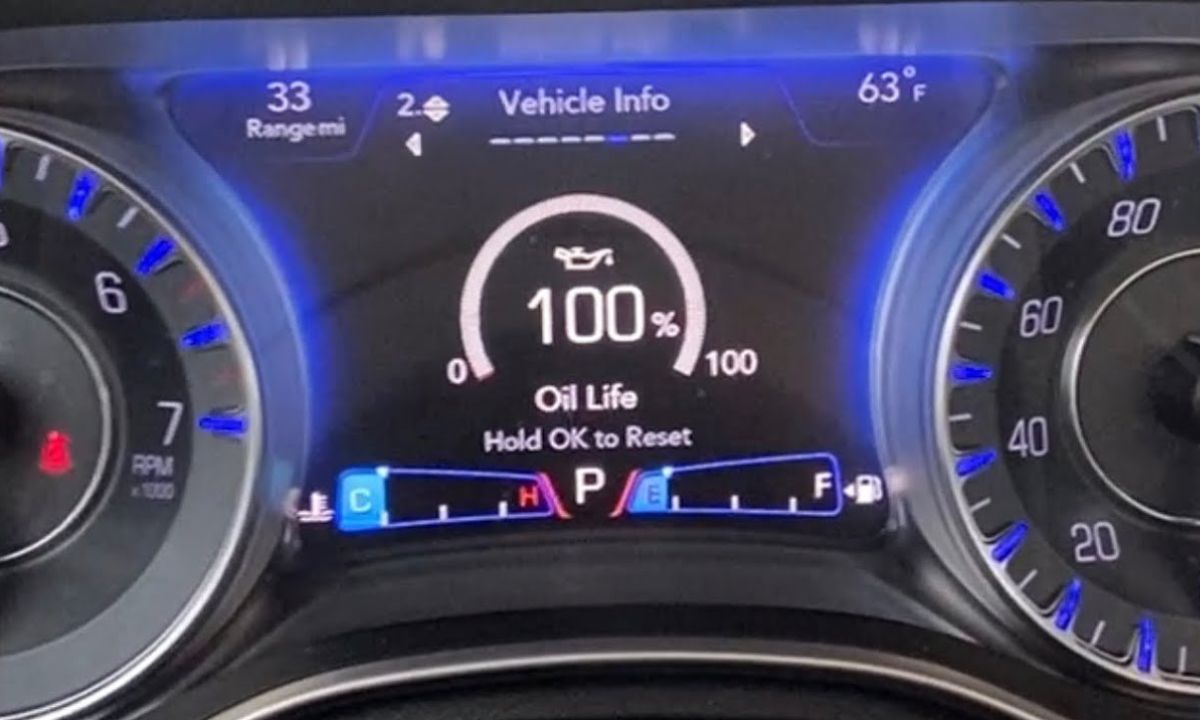
After an oil change on a Chrysler, the service reminder stays on until cleared manually. The procedure varies depending on the model and generation — older Chrysler vehicles use a gas pedal sequence, newer ones use steering wheel controls or a touchscreen menu. The reset takes under a minute once you know which method applies to your car.
With Steering Wheel Controls (Pacifica 2017+, 300, 200)
This is the standard method on most Chrysler models from 2017 onward equipped with a steering wheel menu and instrument cluster display:
- Without pressing the brake pedal, press the Engine Start/Stop button to put the ignition in ON position — do not start the engine.
- Press the left or right arrow on the steering wheel to navigate to the Vehicle Info submenu.
- Press the down arrow to access the Oil Life menu screen.
- Press and hold the OK button until the Oil Life resets to 100%.
- Press the up arrow to exit the menu.
- Turn the ignition off, then start the engine to confirm the light is gone.
If the reminder returns after restarting, the reset did not complete — repeat and hold the OK button for a full 3–5 seconds past the point where the display begins to respond.
With Gas Pedal Sequence (Town & Country, Voyager, Older Pacifica)
This method works on Chrysler minivans and older models without steering wheel menu navigation:
- Close all doors and set the gearbox to Park.
- Turn the ignition to the ON position without starting the engine.
- Fully press and release the gas pedal three times within 10 seconds.
- Turn the ignition off and wait 10 seconds.
- Start the engine and check that the oil change light has cleared.
Timing matters here — three full presses within 10 seconds is the trigger. If the light remains on after the restart, the sequence was too slow or the pedal was not pressed fully to the floor. Repeat with deliberate, complete pedal strokes.
With Trip/Reset Button and Menu (Pacifica 2004–2008, Sebring, Aspen, Crossfire)
Older Chrysler models use a combination of the trip odometer button and dashboard display:
- Turn the ignition to RUN without starting the engine.
- Press the Menu or Reset button repeatedly until RESET SERVICE DISTANCE? NO appears in the display.
- Press the Step button to change it to RESET SERVICE DISTANCE? YES.
- Press the Reset button to confirm.
- Turn the ignition off, then start the engine to verify.
On the 2004–2008 Pacifica specifically, the FSS (Flexible Service System) light and the oil change reminder are separate — resetting one does not clear the other. If both are on after an oil change, go through the procedure twice and confirm both indicators have cleared before switching off.
With Touchscreen (Newer Pacifica Hybrid and Plug-In Variants)
Some Pacifica Hybrid and newer plug-in variants manage the service reminder through the Uconnect infotainment system:
- Start the vehicle or turn the ignition to ON.
- On the touchscreen, go to Settings → Vehicle → Oil Life.
- Tap Reset and confirm the prompt.
- The display will return to 100% oil life.
- Turn the ignition off and restart to verify.
What the Chrysler Oil Life System Measures
Chrysler uses a mileage-based reminder on most models rather than an algorithm that measures real oil condition. The system counts distance from the last reset and triggers the reminder at the interval set at the factory — typically 5,000 miles on conventional oil or 8,000–10,000 miles on full synthetic, depending on the model year and engine.
The reminder does not detect whether the oil has actually been changed. Resetting it without completing the oil change simply delays the warning while the oil continues to degrade. Always reset immediately after the change, not before.
If the oil change light returns within a few hundred miles of a confirmed reset, a fault code stored in the ECU is the more likely cause — not the reminder system. An OBD2 scan will identify what triggered it.