
How to Reset Oil Change Light on Nissan Rogue – All Generations
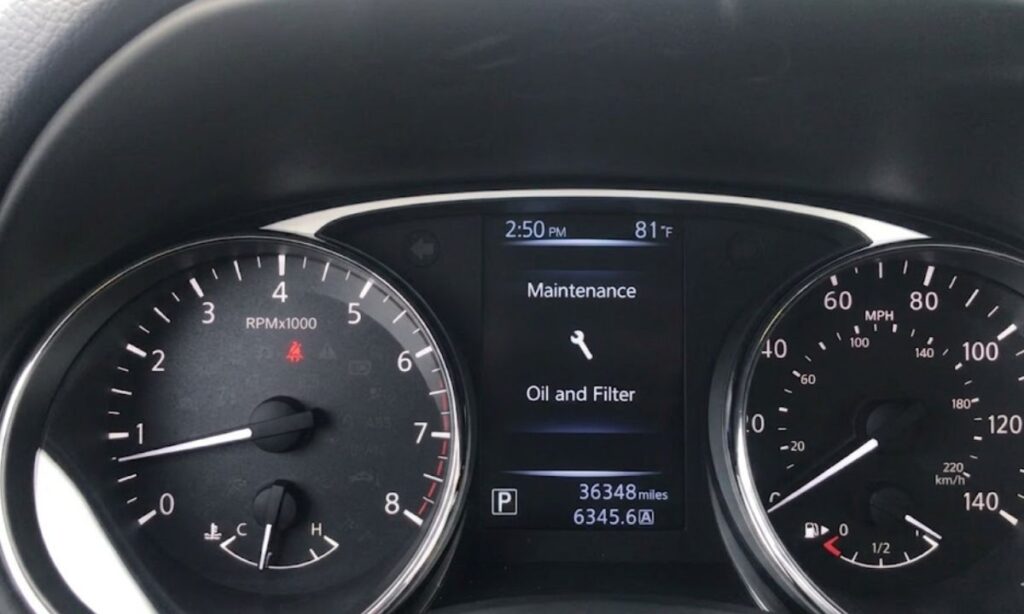
The oil change reminder light on the Nissan Rogue is part of the vehicle’s maintenance minder system, designed to alert you when it’s time for an oil service based on mileage or time intervals. After performing an oil change, the system does not reset automatically — you must manually reset it through a specific sequence depending on your generation of Rogue. Failing to reset the light means it will continue to illuminate even after fresh oil has been added, which can cause confusion about the actual service status of the vehicle. This guide covers the exact reset procedure for every Nissan Rogue generation, including the first-gen (2008–2013), second-gen (2014–2020), third-gen (2021–present), and the Rogue Sport.
Understanding the Oil Change Light on the Nissan Rogue
The Nissan Rogue uses a Maintenance Reminder System (MRS) that tracks oil life based on a combination of engine starts, mileage driven, and sometimes engine load. When the system reaches its threshold, an orange wrench icon or the message ‘CHANGE OIL’ or ‘OIL CHANGE REQUIRED’ appears on the instrument cluster or multi-information display (MID). This is not a low oil pressure warning — that is a separate red oil can icon which requires immediate attention.
How to Reset Oil Change Light – First Generation Nissan Rogue (2008–2013)
The first-generation Rogue uses a simple ignition-based reset procedure without a dedicated button on the cluster:
- Turn the ignition key to the ON position without starting the engine (position II).
- Use the trip odometer button (located on the instrument cluster) to navigate to the Engine Oil maintenance item displayed on the trip computer.
- Once ‘CHANGE OIL’ or the oil life percentage is shown, press and hold the trip odometer reset button for approximately 5 to 10 seconds.
- The display will flash and then reset to 100% or clear the reminder.
- Turn the ignition off, then restart the engine to confirm the light is gone.
If the reset does not take effect, ensure the engine is fully off before starting the sequence again.
How to Reset Oil Change Light – Second Generation Nissan Rogue (2014–2020)
The second generation introduced an updated instrument cluster with a more prominent MID screen:
- Turn the ignition to the ON/RUN position without starting the engine. On push-button start models, press the start button twice without pressing the brake pedal.
- Use the steering wheel controls (left side stalk or toggle buttons) to scroll through the MID menu until you find ‘Maintenance’ or ‘Oil Life’.
- With the oil life screen displayed, press and hold the OK or Enter button on the steering wheel for approximately 5 seconds.
- A confirmation message will appear, asking to reset. Select ‘Yes’ using the directional buttons and confirm with OK.
- The oil life will reset to 100%.
- Turn off the ignition and restart to verify the reminder light has cleared.
On some 2014–2016 trims without steering wheel controls for the MID, use the trip computer stalk on the instrument cluster to navigate and hold to reset, same as the first generation method.
How to Reset Oil Change Light – Third Generation Nissan Rogue (2021–Present)
The third-generation Rogue features a fully digital or semi-digital instrument cluster with an updated maintenance system:
- With the vehicle in Park, press the start button twice without pressing the brake to enter ON mode.
- Press the left directional button on the steering wheel to access the vehicle information menu on the MID.
- Scroll using the up/down arrows until ‘Oil Life’ or ‘Maintenance Reminder’ is highlighted.
- Press and hold the OK button for 5 seconds until a reset prompt appears.
- Confirm the reset by selecting ‘Yes’.
- The system will display ‘Oil Life 100%’ to confirm successful reset.
- Press the start button to turn off the vehicle, then restart to verify.
How to Reset Oil Change Light – Nissan Rogue Sport (2017–Present)
The Rogue Sport shares its reset procedure with the second-generation Rogue but has a slightly different cluster layout on some trims:
- Enter ON mode by pressing the start button twice without the brake.
- Use the trip meter reset button on the instrument cluster or steering wheel controls to navigate to ‘Oil Life’ on the MID display.
- Hold the reset/OK button for 5–10 seconds until the counter resets to 100%.
- Confirm and restart the vehicle.
Common Problems and Troubleshooting
- Light comes back on immediately: This usually means the reset sequence was not completed fully. Repeat the process ensuring you hold the button until the display flashes or a confirmation appears.
- No ‘Oil Life’ option in the menu: Navigate deeper into the MID sub-menus. On some trims it is listed under ‘Vehicle Info’ or ‘Settings’.
- Push-button start model not entering ON mode: Make sure the brake pedal is NOT pressed when pressing the start button. Pressing twice without brake = ON mode; pressing with brake = engine start.
- Oil change light is red, not orange: A red oil light is the low oil pressure warning — this is a separate system. Do not confuse it with the maintenance reminder. Check oil level and pressure immediately if a red light appears.
- Reset works but light returns after a few days: The maintenance minder may have multiple service items queued. Check all items in the maintenance menu and reset each one individually.
How Often Should You Reset the Oil Change Light?
Reset the oil change light only after a confirmed oil and filter change using the correct specification oil. For most Nissan Rogue generations, the recommended interval is every 5,000 miles using conventional oil or every 7,500 to 10,000 miles with full synthetic oil, depending on driving conditions and model year. Always consult the owner’s manual for the exact oil specification — most Rogue models require 0W-20 full synthetic engine oil.
