How to Reset Oil Change Light on Hyundai Elantra – All Generations
The oil change reminder light on the Hyundai Elantra is a maintenance interval indicator that notifies you when the vehicle’s onboard system calculates it is time for an oil service. After performing an oil change, the light must be manually reset — it does not turn off automatically. Failing to reset it will cause the reminder to appear again immediately or continue counting incorrectly, which can lead to confusion about actual service intervals. This guide covers every generation of the Hyundai Elantra with exact, step-by-step reset procedures for each.
Understanding the Oil Change Light on the Hyundai Elantra
The Hyundai Elantra uses a mileage-based or time-based oil service interval system, not a real-time oil quality sensor. The system tracks driven distance and time elapsed since the last reset. When the threshold is reached — typically 3,000 to 7,500 miles depending on model year and oil type used — the oil service reminder activates. The light usually appears as a wrench icon, an oil can symbol, or a text message such as ‘Service Required’ or ‘Oil Maintenance Required’ in the instrument cluster or multi-information display (MID).
Hyundai Elantra Generations Overview
- 1st Generation (J1) – 1990 to 1995: No electronic oil reminder system
- 2nd Generation (J2) – 1996 to 2000: No electronic oil reminder system
- 3rd Generation (XD) – 2001 to 2006: Basic service reminder, limited trim levels
- 4th Generation (HD) – 2007 to 2010: Oil maintenance light in instrument cluster
- 5th Generation (MD/UD) – 2011 to 2016: Service interval light with trip computer display
- 6th Generation (AD) – 2017 to 2020: Multi-information display with service message
- 7th Generation (CN7) – 2021 to present: Digital cluster with oil life and maintenance system
How to Reset Oil Change Light – Hyundai Elantra XD (2001–2006)
Some higher-trim XD models include a basic odometer-based service reminder. If your XD has a service light:
- Turn the ignition to the ON position (do not start the engine)
- Use the trip reset button on the instrument cluster to navigate to the odometer display showing ‘SERVICE’
- Press and hold the trip reset button for 5 to 10 seconds until the indicator resets or disappears
- Turn the ignition off and restart to confirm the light is off
How to Reset Oil Change Light – Hyundai Elantra HD (2007–2010)
- Turn the ignition key to the ON position without starting the engine
- Press the trip meter reset button (TRIP/RESET) repeatedly until the odometer display shows the oil service indicator or mileage remaining
- Hold the TRIP/RESET button for approximately 5 seconds
- The display will flash and then reset to the full service interval
- Turn the ignition off, then start the engine to verify the light has been cleared
How to Reset Oil Change Light – Hyundai Elantra MD/UD (2011–2016)
- Turn the ignition to the ON/ACC position without cranking the engine
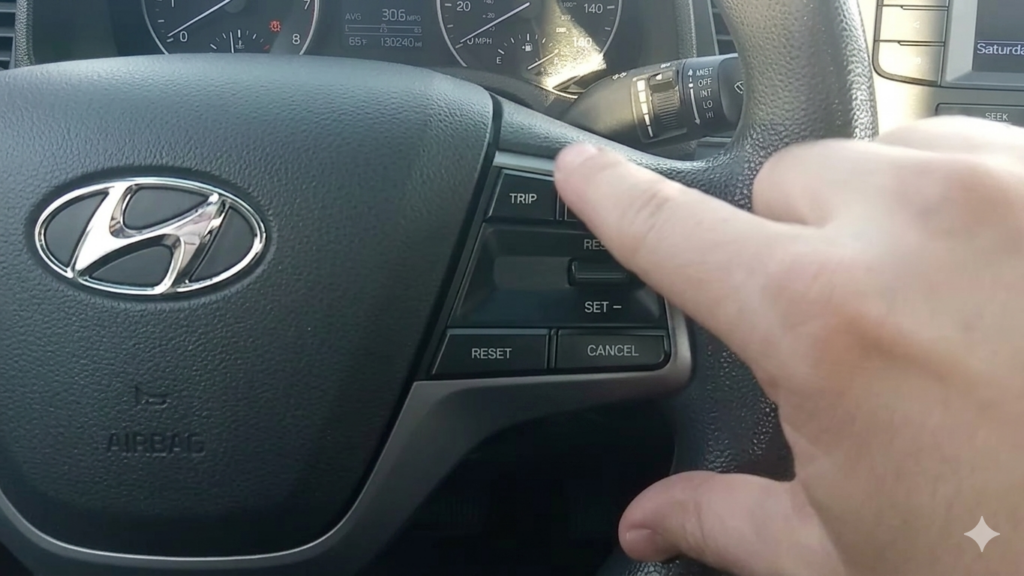
- Use the steering wheel-mounted controls or the instrument cluster button to scroll through the trip computer menu until you see ‘Oil Life’ or ‘Service Interval’
- Once the oil life screen is displayed, press and hold the OK or SELECT button for 5 seconds
- The system will display a confirmation message such as ‘Reset Complete’ or the percentage will return to 100%
- Alternatively, locate the trip reset stalk button on the left of the steering column, hold it with the service screen displayed
- Switch off the ignition and restart to confirm the reset
How to Reset Oil Change Light – Hyundai Elantra AD (2017–2020)
- Turn the ignition to the ON position without starting the vehicle
- Press the MODE button on the instrument cluster or use steering wheel controls to navigate the multi-information display (MID)
- Scroll to ‘Vehicle Settings’ or ‘Trip Information’ in the MID
- Find and select ‘Oil Life’ or ‘Service Interval Reset’
- Press and hold OK or ENTER for approximately 5 seconds to initiate the reset
- A message confirming ‘Oil Life Reset’ or similar will appear
- Start the engine and verify the oil service indicator has cleared from the dashboard
How to Reset Oil Change Light – Hyundai Elantra CN7 (2021–Present)
- With the vehicle parked and in the OFF state, press the start button once (engine off, electronics on)
- On the digital instrument cluster, navigate using the left steering wheel control buttons to the ‘Vehicle’ menu
- Select ‘Service Interval’ or ‘Maintenance’ from the submenu
- Highlight the ‘Oil Service’ option
- Press and hold the OK button for 5 seconds — the system will prompt a confirmation
- Confirm the reset by selecting ‘Yes’ when prompted on screen
- The oil life indicator will return to 100% or the interval counter will reset to the full mileage interval
- Start the vehicle and confirm no oil change indicator appears on the cluster
Alternative Reset Method Using the Ignition and Accelerator Pedal
On some Elantra models, particularly the HD and MD generations, an alternative reset method using the accelerator pedal can be used if the standard method does not work:
- Ensure the vehicle is completely off
- Press and hold the accelerator pedal fully down
- While holding the pedal, turn the ignition to the ON position (do not start)
- Hold the pedal down for 10 to 15 seconds until the oil service light flashes and then extinguishes
- Release the pedal, turn the ignition off, and start the engine to confirm
Common Issues When Resetting the Oil Change Light
- Light comes back immediately: The reset was not held long enough or the procedure was not completed fully — repeat and hold for a longer duration
- No oil service option in MID: Navigate deeper into vehicle settings; some trims require entering a secondary menu under ‘Settings’ before ‘Maintenance’ appears
- Light reappears after a few days: The interval may be set to a short mileage threshold — check settings if your model allows interval customisation
- Check engine light on simultaneously: This is a separate OBD-II fault unrelated to the oil service reminder and requires a diagnostic scan with an OBD reader
- Battery disconnection causes reset loss: On CN7 models, disconnecting the battery may reset settings; re-enter the procedure after reconnecting the battery
Recommended Oil Change Intervals for the Hyundai Elantra
- Conventional oil (all pre-2011 models): Every 3,000 to 5,000 miles or every 6 months
- Synthetic blend (2011–2016 MD/UD): Every 5,000 to 7,500 miles
- Full synthetic (2017–2020 AD): Every 7,500 miles or 12 months under normal conditions
- Full synthetic (2021–present CN7): Every 7,500 miles standard; 5,000 miles under severe conditions (frequent short trips, extreme temperatures, heavy traffic)